
In short: WooCommerce doesn’t issue invoices, so every shop has to solve it its own way. For businesses in Poland there’s also KSeF, the national system B2B invoices must go through since 2026. Below we compare three ways to handle invoices in WooCommerce, explain what to look for in a plugin and show how PDF Invoices, Credit Notes & KSeF for WooCommerce works.
Three ways to handle invoices in a WooCommerce shop
| By hand in software | External invoicing service | Plugin in the shop | |
|---|---|---|---|
| Retyping data | Yes, for every order | No, with an integration | No |
| Cost | Software + your time | Monthly subscription | Yearly licence |
| Data | In the software | On the service’s servers | In your shop |
| Credit notes for refunds | By hand | Depends on the integration | Automatic |
| KSeF | In the software | In the service | Straight from the shop |
Doing it by hand works for a few orders a month. An external service is a good choice if you already run your whole business there. A plugin is simplest when invoices are mainly for shop sales – everything happens where the order is created.
What to look for in an invoice plugin
Up-to-date KSeF support
If you’re VAT-registered in Poland, B2B invoices must go to KSeF as structured invoices in the FA(3) schema. Check whether the plugin sends invoices and credit notes on its own, shows the KSeF number and QR code on the PDF and lets you start in the test environment.
Credit notes for refunds
A WooCommerce refund doesn’t create a document. A good plugin issues the credit note itself – including for partial refunds, split across VAT rates.
Numbering and unchangeable invoices
Gap-free, duplicate-free numbers, a pattern with monthly or yearly reset and the option to continue numbering from previous software. An issued invoice must not change when the order is edited.
A VAT ID field in the block checkout
New WooCommerce shops use the block checkout. The VAT ID field must work there too, or you can’t tell businesses from consumers.
VAT in different situations
VAT-registered or VAT exempt, reverse charge for EU businesses, euro invoices with VAT converted at the National Bank of Poland rate.
A register and exports for your accountant
A summary with totals, CSV and a ZIP of PDFs – ideally sent to your accountant automatically.
Invoice language and compatibility
Invoices in the order language for multilingual shops, plus HPOS and current WooCommerce compatibility.
What PDF Invoices, Credit Notes & KSeF for WooCommerce does
Invoices that issue themselves
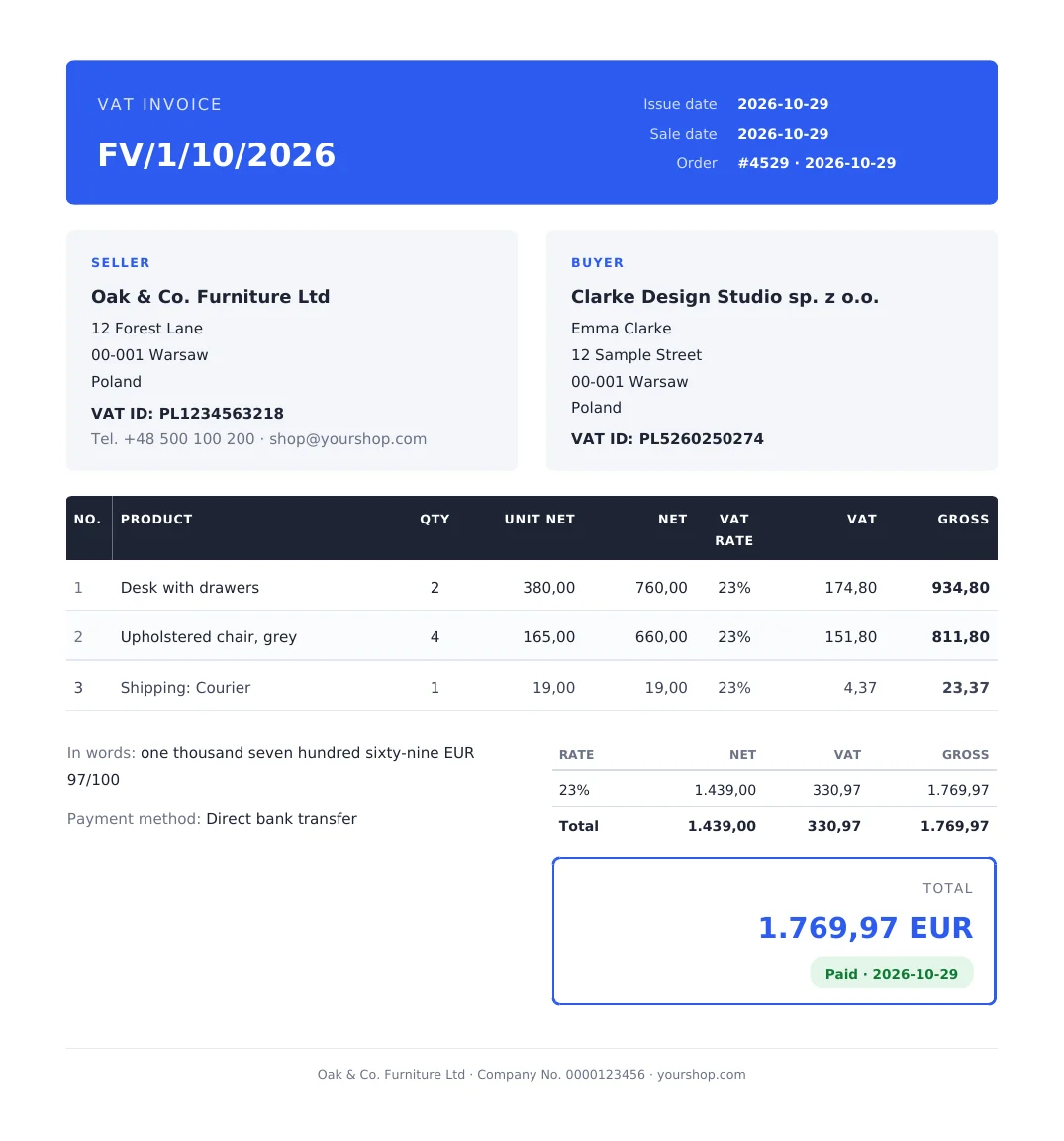
The invoice is created at the order status you choose, attached to the WooCommerce e-mail and available in the customer’s My Account. Numbering follows your pattern, with no gaps. Details in how to generate invoices automatically in WooCommerce.
KSeF with one switch
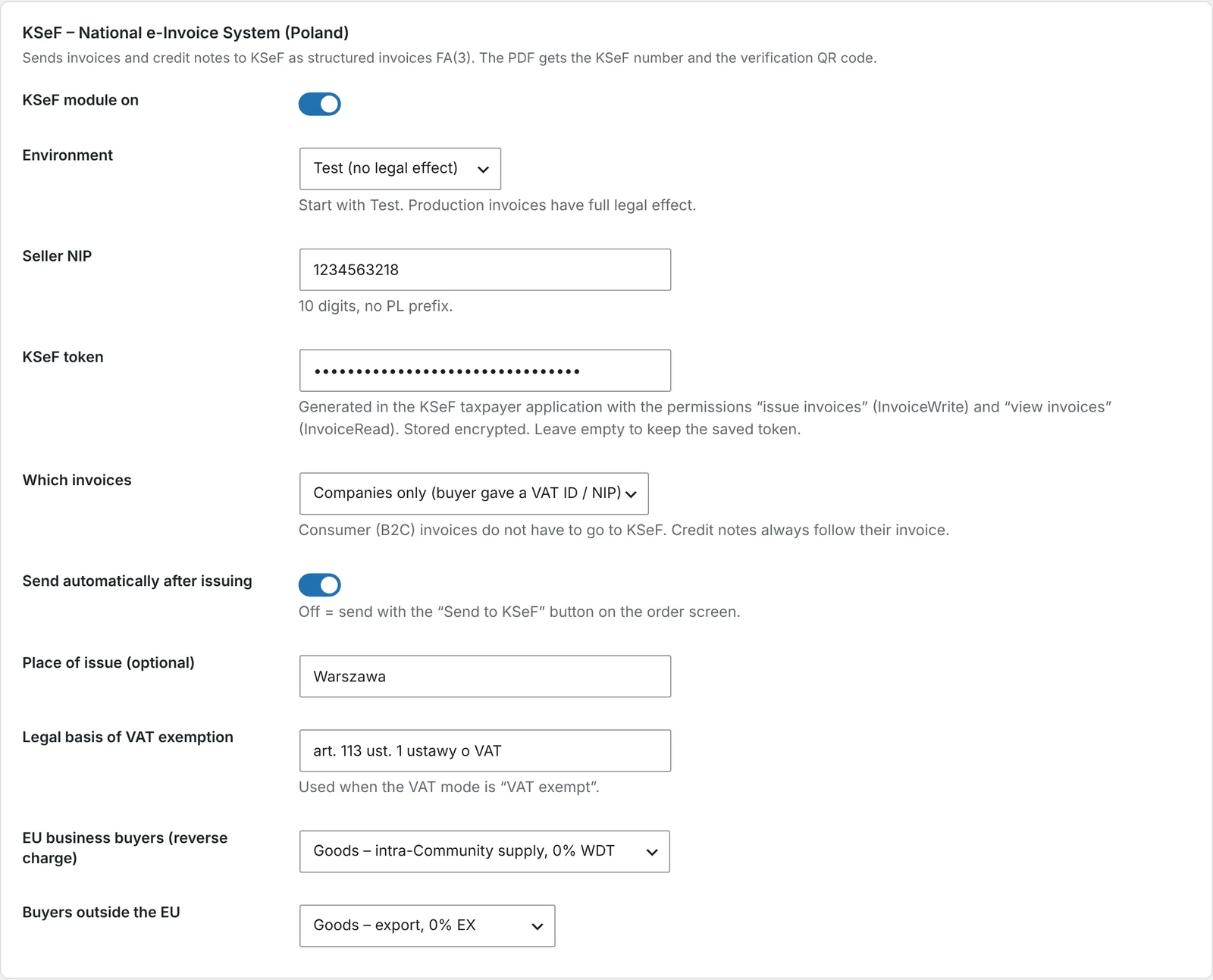
Enter your VAT ID and token – invoices and credit notes go to KSeF in the background. The PDF shows the KSeF number and a QR code, and you can download the UPO and XML from the order. More in how to send WooCommerce invoices to KSeF.
A credit note for every refund
Full refund, some items or just an amount – the credit note is issued automatically and sent with the refund e-mail. See how to issue a credit note in WooCommerce.
Pro forma and packing slip
A pro forma for bank transfers, with your account number and payment reference, and a price-free packing slip for the parcel. See how to send a pro forma invoice in WooCommerce.
Register and accountant pack
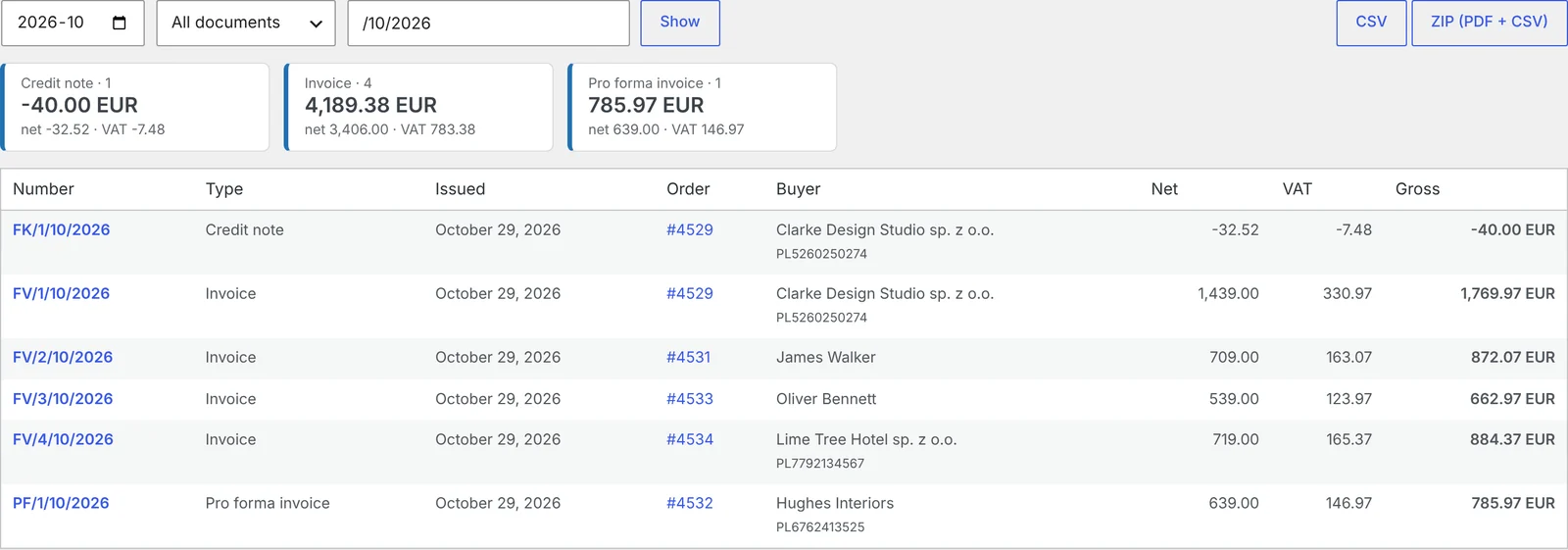
Every document for the month with totals, CSV and ZIP export, and automatic sending to your accountant. See how to send your accountant all WooCommerce invoices every month.
Looks like your company
Two templates – Aurora and Ledger – with your logo and colour, amount in words in English and Polish, and a “Paid” or “Due by” box.
Who is this plugin for?
- shops VAT-registered in Poland that sell to businesses and must send invoices to KSeF,
- shops that currently retype orders into invoicing software,
- shops with lots of returns, where credit notes eat up time,
- multilingual shops that want invoices in the customer’s language.
How much does it cost?
The Pro version is a yearly licence with updates and support. Before you buy, you can test the full version free for 7 days – ideally together with the KSeF test environment.
Frequently asked questions
Does the plugin replace invoicing software?
For shop sales – yes. Invoices, credit notes and pro formas are created from orders, and B2B invoices go to KSeF.
Can I switch from other software without changing the numbering?
Yes. You enter the number the next invoice should get, and numbering continues.
Does the plugin work if I’m VAT exempt?
Yes. In exempt mode the document has a single price column and an exemption note.
What happens to invoices when the licence expires?
You can still download issued documents, and the register and exports keep working. New documents won’t be issued or sent to KSeF.
Do invoices work with the block checkout?
Yes. The VAT ID field works in both the classic and the block checkout, and the plugin is HPOS compatible.
8 November 2026 · 5 min read
How to Send Your Accountant All WooCommerce Invoices Every Month – Without Collecting Them by Hand
Month end in an online shop often means an evening of downloading invoices and copying totals into a…
7 November 2026 · 5 min read
How to Send a Pro Forma Invoice in WooCommerce for Bank Transfer Payments
A customer picked bank transfer and needs a document to pay from – especially if a company is…
6 November 2026 · 6 min read
How to Issue a Credit Note in WooCommerce When a Customer Returns an Item
Refunding money in WooCommerce is only half the job – if the order had an invoice, you need…
5 November 2026 · 6 min read
How to Generate Invoices Automatically in WooCommerce When an Order Is Completed
WooCommerce sends order confirmations but doesn't create invoices. Here's when to issue an invoice in an online shop,…
4 November 2026 · 7 min read
How to Send WooCommerce Invoices to KSeF Automatically (Poland’s e-Invoicing System)
Poland's KSeF e-invoicing system changed how online shops issue invoices. Here's who it applies to and when, what…
6 November 2026 · 5 min read
WooCommerce Plugin That Connects Your Store with Allegro – Listings, Stock and Orders
If you sell in WooCommerce and on Allegro, you probably edit products twice, correct stock by hand and…
5 November 2026 · 5 min read
How to Add GPSR Data to Allegro Listings from WooCommerce?
Since December 2024, listings on Allegro must include the data required by the EU General Product Safety Regulation.…
4 November 2026 · 5 min read
How to Get Allegro Orders into WooCommerce Automatically?
Handling Allegro orders in one panel and store orders in another means retyping addresses, parcel locker codes and…
3 November 2026 · 6 min read
How to List WooCommerce Products on Allegro in Polish from a Multilingual Store?
Allegro buyers search in Polish, Allegro has its own categories and required parameters, and titles are limited to…
3 November 2026 · 5 min read
A WooCommerce Plugin That Notifies Your Warehouse and Accountant When an Order Status Changes
Forwarding orders in chat apps and passing e-mails along is daily life for many shops. Learn how to…