
In short: A pro forma invoice is a document with an offer and payment details – not a VAT invoice. It isn’t recorded for VAT and doesn’t go to Poland’s KSeF, but it makes bank transfer payments much easier – especially for companies that need to approve a purchase before paying. For bank transfers, WooCommerce only sends an e-mail with your account details. Below we explain when a pro forma helps, what it should include and how to issue it automatically.
What is a pro forma invoice?
A pro forma looks like an invoice but isn’t one. It tells the customer how much to pay and to whom. The key differences:
| Pro forma invoice | VAT invoice | |
|---|---|---|
| Accounting document | No | Yes |
| Recorded for VAT | No | Yes |
| Goes to KSeF (Poland) | No | B2B invoices – yes |
| Numbering | Its own series | Its own series |
| When | Before payment | After the sale or payment |
After payment, the customer still gets a normal VAT invoice.
When is a pro forma useful in an online shop?
- Bank transfer. The customer has the account number, amount and payment reference in one document.
- Business customers. Many companies only pay once purchasing or accounts has approved a document.
- Larger and wholesale orders. A pro forma works like a quote with a payment deadline.
- Orders that need a quote. When you set the shipping cost after the order is placed, the pro forma shows the final amount to pay.
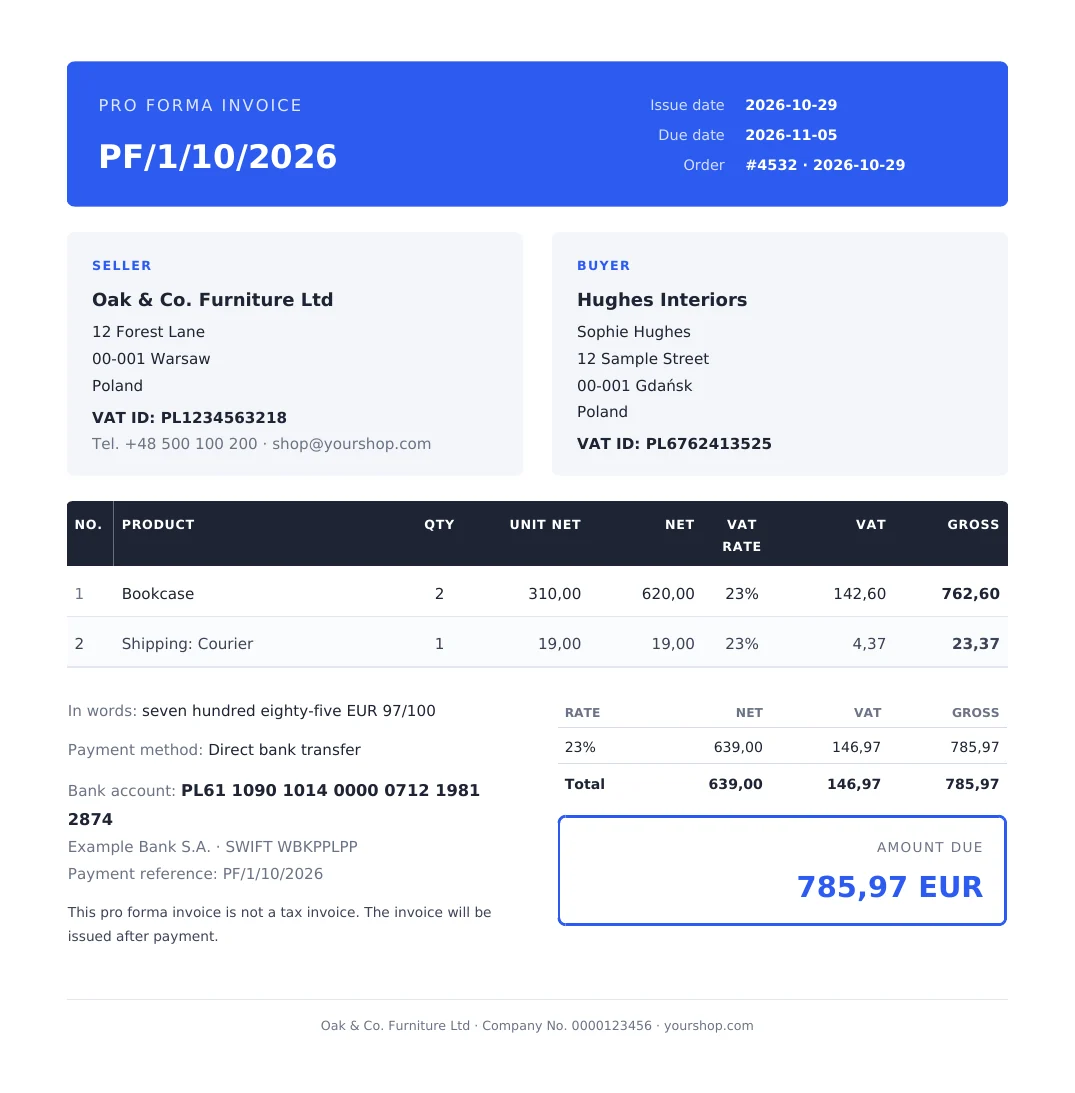
What should a pro forma include?
- the words “Pro forma invoice” and its own number, e.g. PF/{n}/{MM}/{YYYY},
- seller and buyer details,
- the order items with prices, shipping and total,
- your bank account number and bank name,
- the payment reference, ideally with the order number,
- the payment deadline,
- a note that the document is not a VAT invoice.
How does bank transfer work in WooCommerce?
When a customer chooses direct bank transfer, the order gets the status “On hold” and the customer receives the “Order on-hold” e-mail with the bank details from your WooCommerce settings. When you see the money, you change the status to “Processing” by hand.
One thing is missing: a document the customer can pass on for payment. The simplest fix is to attach the pro forma to the “Order on-hold” e-mail.
After payment: an invoice instead of the pro forma
Once the money arrives, you issue a normal VAT invoice – ideally automatically at the status change. See how to generate invoices automatically in WooCommerce. The pro forma stays on the order as history but is no longer needed.
How to issue pro formas automatically, step by step
WooCommerce doesn’t issue documents, so you need a plugin. We’ll show it with PDF Invoices, Credit Notes & KSeF for WooCommerce.
Step 1: switch on pro formas
Go to WooCommerce → Invoices → Settings, section Pro forma invoice, and switch it on. Set the number pattern, e.g. PF/{n}/{MM}/{YYYY}.
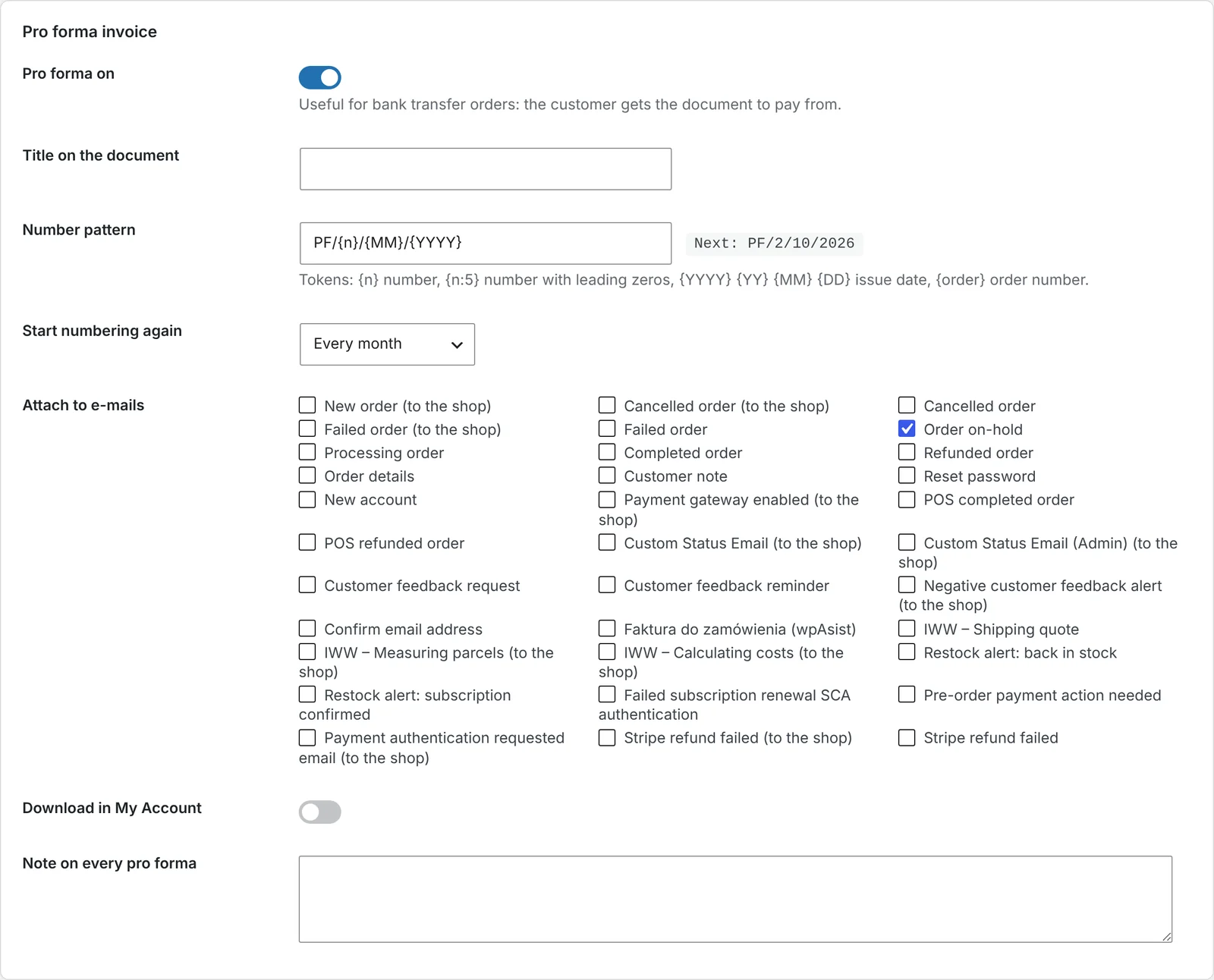
Step 2: attach the pro forma to the bank transfer e-mail
Choose to attach the pro forma to the “Order on-hold” e-mail. Customers paying by bank transfer get it together with their order confirmation.
Step 3: add your payment details
In Your company, enter your bank name and account number (IBAN), and in VAT and dates the payment term in days. These details appear on the pro forma.
Step 4: issue a pro forma manually when you need one
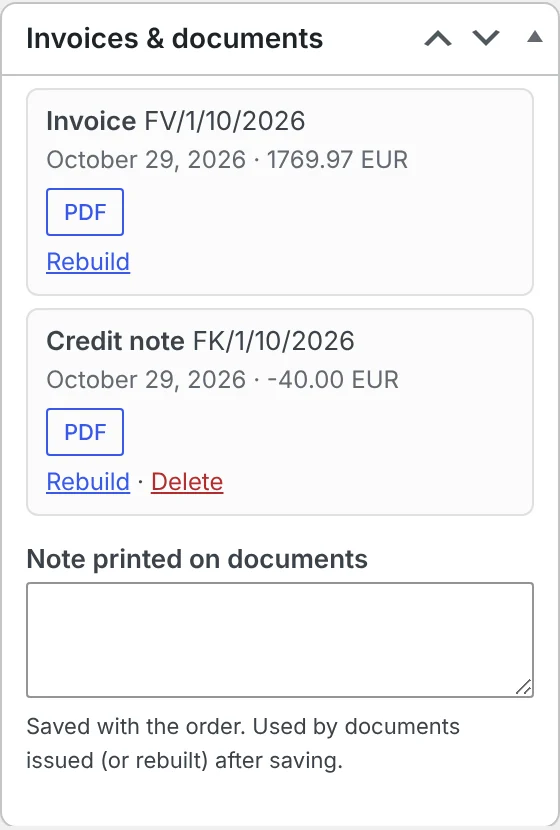
You can also issue a pro forma with the Issue pro forma button in the documents box on the order – e.g. for a phone order.
Things to watch out for
- A pro forma doesn’t replace an invoice. Always issue a VAT invoice after payment.
- Don’t send pro formas to KSeF. They aren’t invoices for VAT purposes.
- Separate numbering. Pro formas have their own series and don’t take numbers from invoices.
- Current amount. If you change the order before payment, issue a new pro forma with the correct total.
Frequently asked questions
Is a pro forma invoice an accounting document?
No. It’s an informational document – an offer with payment details. It isn’t recorded for VAT.
Does a pro forma go to KSeF?
No. Only VAT invoices and credit notes go to KSeF.
Do I need to issue an invoice after a pro forma?
Yes. After payment or delivery you issue a normal VAT invoice.
Can the pro forma reach the customer automatically?
Yes, as an attachment to the WooCommerce “Order on-hold” e-mail that customers paying by bank transfer receive.
Can customers download the pro forma in their account?
Yes, if you enable pro forma downloads in My Account.
8 November 2026 · 5 min read
How to Send Your Accountant All WooCommerce Invoices Every Month – Without Collecting Them by Hand
Month end in an online shop often means an evening of downloading invoices and copying totals into a…
6 November 2026 · 6 min read
How to Issue a Credit Note in WooCommerce When a Customer Returns an Item
Refunding money in WooCommerce is only half the job – if the order had an invoice, you need…
5 November 2026 · 6 min read
How to Generate Invoices Automatically in WooCommerce When an Order Is Completed
WooCommerce sends order confirmations but doesn't create invoices. Here's when to issue an invoice in an online shop,…
4 November 2026 · 7 min read
How to Send WooCommerce Invoices to KSeF Automatically (Poland’s e-Invoicing System)
Poland's KSeF e-invoicing system changed how online shops issue invoices. Here's who it applies to and when, what…
6 November 2026 · 5 min read
WooCommerce Plugin That Connects Your Store with Allegro – Listings, Stock and Orders
If you sell in WooCommerce and on Allegro, you probably edit products twice, correct stock by hand and…
5 November 2026 · 5 min read
How to Add GPSR Data to Allegro Listings from WooCommerce?
Since December 2024, listings on Allegro must include the data required by the EU General Product Safety Regulation.…
4 November 2026 · 5 min read
How to Get Allegro Orders into WooCommerce Automatically?
Handling Allegro orders in one panel and store orders in another means retyping addresses, parcel locker codes and…
3 November 2026 · 6 min read
How to List WooCommerce Products on Allegro in Polish from a Multilingual Store?
Allegro buyers search in Polish, Allegro has its own categories and required parameters, and titles are limited to…
3 November 2026 · 5 min read
A WooCommerce Plugin That Notifies Your Warehouse and Accountant When an Order Status Changes
Forwarding orders in chat apps and passing e-mails along is daily life for many shops. Learn how to…
2 November 2026 · 7 min read
How to Sync WooCommerce Stock and Prices with Allegro When Your Store Uses EUR?
Selling the same products in a euro-priced WooCommerce store and on Allegro in złoty raises two questions: how…