
In short: Your accountant needs all invoices and credit notes for the month plus a summary with net, VAT and gross totals. WooCommerce has no document register, so in many shops someone downloads PDFs one by one at month end and copies the totals into a spreadsheet. You can automate it: the register adds up the totals, and on a chosen day each month your accountant receives an e-mail with the summary and every document.
What does an accountant need from an online shop?
Agree the details with your accountant, but it’s usually:
- sales invoices for the month,
- credit notes – returns and refunds,
- a summary of all documents with numbers, dates, buyers and net, VAT and gross amounts,
- a split by currency, if you also sell in euros or other currencies,
- information about sales without invoices, e.g. to consumers – how you record those depends on your situation.
Pro formas usually aren’t needed, because they aren’t accounting documents.
What does it look like without automation?
The usual scenario: on the last day of the month someone opens the order list, downloads invoices one after another, collects them in a folder, totals them in a spreadsheet and e-mails everything. With a few dozen orders that’s an hour or two. With a few hundred, it’s a whole evening – with a real risk of losing a credit note.
A document register instead of a spreadsheet
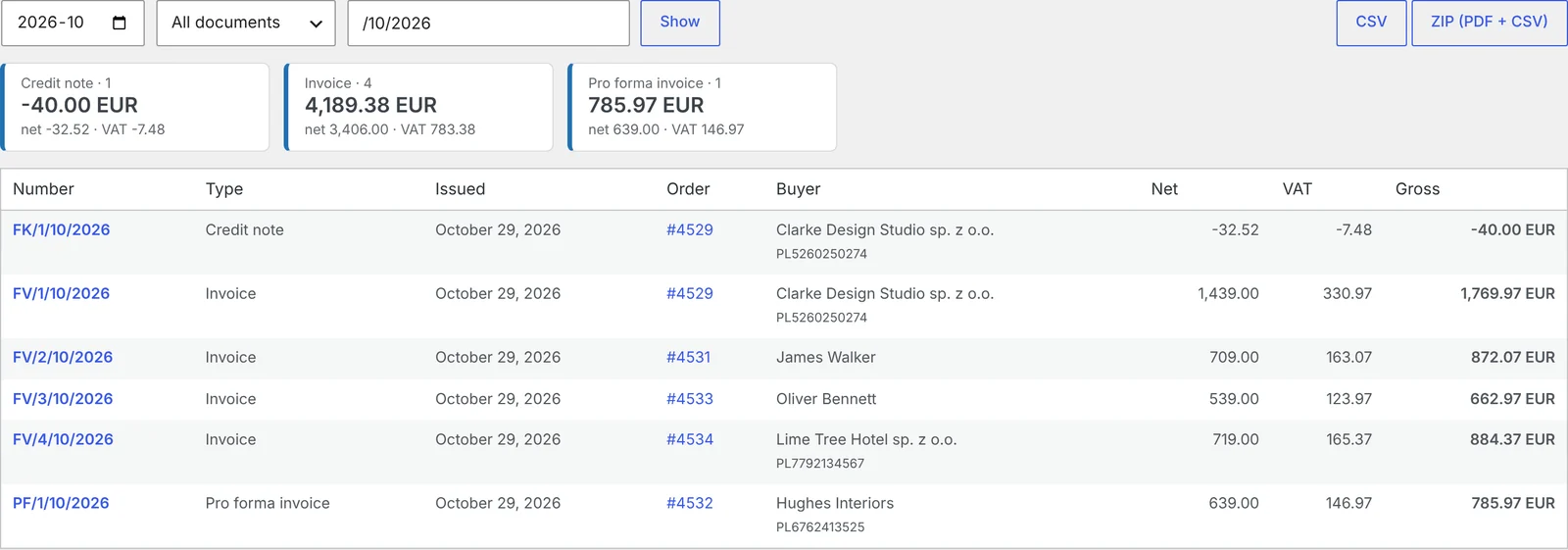
A good document register in the shop:
- shows every document for the month – invoices, credit notes, pro formas,
- calculates net, VAT and gross totals, separately by document type and currency,
- lets you search by number, buyer and VAT ID,
- exports a CSV you can open in Excel or import into accounting software,
- downloads a ZIP of all PDFs for the month in one click.
An automatic pack for your accountant every month
The next step is sending it without you. On a chosen day each month, your accountant receives an e-mail with:
- a CSV summary of the previous month’s documents,
- a ZIP with all the PDFs.
If your accountant asks for another month or needs it earlier, you can send it manually with one button.
What about KSeF?
In Poland, B2B invoices sent to KSeF can be downloaded by the accountant straight from the system, if they have access. The shop summary is still useful: it also covers consumer invoices outside KSeF, credit notes and the currency split, and the totals make it easy to check nothing is missing. More in how to send WooCommerce invoices to KSeF automatically.
How to set up the monthly accountant pack, step by step
WooCommerce has no document register, so you need a plugin. We’ll show it with PDF Invoices, Credit Notes & KSeF for WooCommerce.
Step 1: check the register
Go to WooCommerce → Invoices → Register. Pick a month and see the document list with totals. Buttons let you download the CSV and the ZIP of PDFs.
Step 2: switch on automatic sending
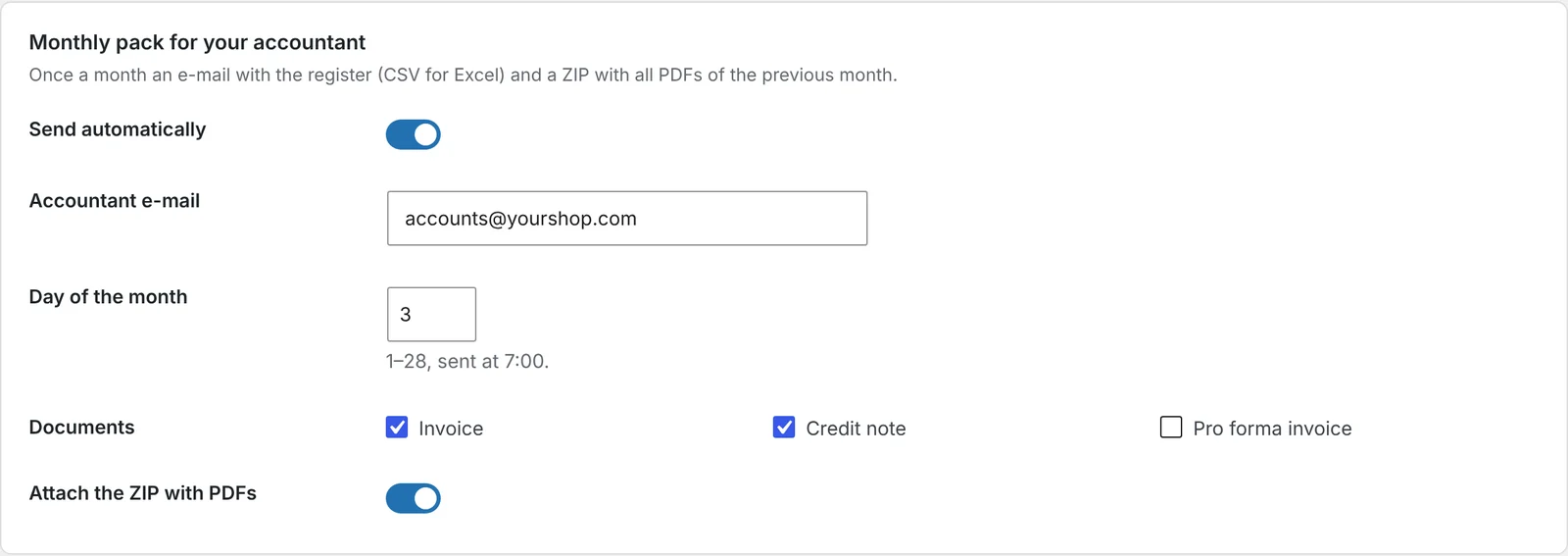
In WooCommerce → Invoices → Settings, find the Monthly pack for your accountant section. Tick Send automatically, enter your accountant’s e-mail and a day of the month from 1 to 28. The pack goes out at 7:00.
Step 3: choose what’s included
Choose which document types go into the pack and whether to attach the ZIP of PDFs or just the CSV summary.
Step 4: send a test pack
In Tools → Send the accountant pack now, choose a month and send it. Check with your accountant that the CSV format works for them.
Things to watch out for
- Pick a day after month end. The 3rd of the month, for example, leaves time for late returns and credit notes.
- Make sure the e-mail arrives. A large ZIP of PDFs can be rejected by the mailbox. Send mail via SMTP and check your accountant’s attachment limit.
- Agree the format. Some firms prefer just the CSV for import, others want every PDF.
Frequently asked questions
Does WooCommerce have an invoice report?
No. WooCommerce has sales reports but no invoice register, because it doesn’t issue invoices.
In what format does the accountant get the summary?
As a CSV file you can open in Excel or import into accounting software, plus an optional ZIP with every PDF.
Can I send a pack for an earlier month?
Yes. In the tools you choose any month and send the pack straight away.
Are credit notes included in the summary?
Yes. The register covers invoices, credit notes and pro formas, with totals for each type.
Does the summary handle different currencies?
Yes. Totals are calculated separately for each currency.
7 November 2026 · 5 min read
How to Send a Pro Forma Invoice in WooCommerce for Bank Transfer Payments
A customer picked bank transfer and needs a document to pay from – especially if a company is…
6 November 2026 · 6 min read
How to Issue a Credit Note in WooCommerce When a Customer Returns an Item
Refunding money in WooCommerce is only half the job – if the order had an invoice, you need…
5 November 2026 · 6 min read
How to Generate Invoices Automatically in WooCommerce When an Order Is Completed
WooCommerce sends order confirmations but doesn't create invoices. Here's when to issue an invoice in an online shop,…
4 November 2026 · 7 min read
How to Send WooCommerce Invoices to KSeF Automatically (Poland’s e-Invoicing System)
Poland's KSeF e-invoicing system changed how online shops issue invoices. Here's who it applies to and when, what…
6 November 2026 · 5 min read
WooCommerce Plugin That Connects Your Store with Allegro – Listings, Stock and Orders
If you sell in WooCommerce and on Allegro, you probably edit products twice, correct stock by hand and…
5 November 2026 · 5 min read
How to Add GPSR Data to Allegro Listings from WooCommerce?
Since December 2024, listings on Allegro must include the data required by the EU General Product Safety Regulation.…
4 November 2026 · 5 min read
How to Get Allegro Orders into WooCommerce Automatically?
Handling Allegro orders in one panel and store orders in another means retyping addresses, parcel locker codes and…
3 November 2026 · 6 min read
How to List WooCommerce Products on Allegro in Polish from a Multilingual Store?
Allegro buyers search in Polish, Allegro has its own categories and required parameters, and titles are limited to…
3 November 2026 · 5 min read
A WooCommerce Plugin That Notifies Your Warehouse and Accountant When an Order Status Changes
Forwarding orders in chat apps and passing e-mails along is daily life for many shops. Learn how to…
2 November 2026 · 7 min read
How to Sync WooCommerce Stock and Prices with Allegro When Your Store Uses EUR?
Selling the same products in a euro-priced WooCommerce store and on Allegro in złoty raises two questions: how…