
In short: KSeF (Krajowy System e-Faktur, Poland’s National e-Invoicing System) is the government platform through which businesses in Poland issue and receive invoices. Since 2026, invoices to businesses must go through it – and online shops are no exception. WooCommerce itself doesn’t issue invoices or connect to KSeF. Below we explain who the obligation applies to and when, what exactly must be sent, how to prepare your shop and how to send invoices to KSeF automatically.
What is KSeF and why does it matter for online shops?
KSeF is a Polish Ministry of Finance system in which an invoice exists as an XML file with a strictly defined structure (a “structured invoice” in the FA(3) schema). The invoice is no longer simply “sent to the customer”. It goes to KSeF, receives a unique KSeF number there, and the buyer downloads it from the system.
It matters to you if your business is VAT-registered in Poland – a Polish shop, or a foreign company with a fixed establishment in Poland. For an online shop that means three changes:
- every invoice to a business must go to KSeF, otherwise it hasn’t formally been issued,
- an invoice that is already in KSeF can’t be edited or deleted – mistakes are fixed only with a credit note,
- the shop needs to know whether the buyer is a business, so checkout needs a VAT ID (NIP) field.
When did KSeF become mandatory?
| Date | Who it applies to |
|---|---|
| 1 February 2026 | Businesses with 2024 sales above PLN 200 million. From this date all businesses must also be able to receive invoices via KSeF |
| 1 April 2026 | All other taxpayers |
| 1 January 2027 | The smallest businesses whose invoiced sales don’t exceed PLN 10,000 gross a month – until the end of 2026 they may still issue invoices outside KSeF. Once the limit is exceeded, the obligation applies from the invoice that crossed it |
| 1 January 2027 | Penalties start for invoices issued outside KSeF – up to 100% of the VAT shown on such an invoice |
So 2026 is a transition year without penalties, but the obligation already applies. Confirm the details for your business with your accountant.
Invoices to businesses and consumers – what must go to KSeF?
| Type of invoice | KSeF |
|---|---|
| Invoice to a business (B2B, with a VAT ID) | Mandatory |
| Invoice to a private customer (B2C) | Optional – you can issue it in KSeF or outside it |
| Credit note | Same as the invoice it corrects |
| Pro forma invoice | No – it isn’t an invoice for VAT purposes |
Consumers don’t have to use KSeF. If you issue their invoice in the system, you still have to give it to them in a readable form, e.g. a PDF by e-mail or in their account. That printout can include a QR code that lets anyone verify the invoice in KSeF.
What changes in the shop’s daily work?
- Buyer details must be right first time. A correction note isn’t enough – a wrong VAT ID or company name needs a credit note.
- The issue date is the date it’s sent to KSeF. An invoice that’s “prepared” in the shop but not sent doesn’t formally exist yet.
- Foreign-currency invoices. VAT on a structured invoice is stated in PLN, converted at the NBP (National Bank of Poland) rate from the last working day before the tax point.
- Nothing gets deleted. You fix mistakes with a credit note, which also goes to KSeF.
- Business customers download the invoice from KSeF, but many still want a PDF by e-mail – so it’s worth doing both.
How to prepare a WooCommerce shop for KSeF
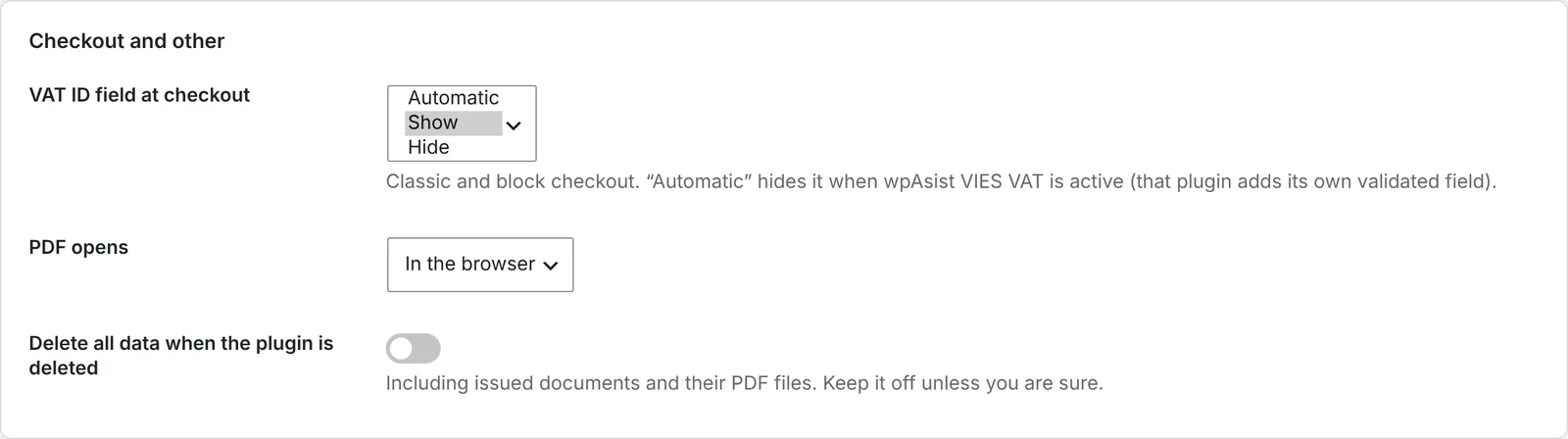
1. Add a VAT ID field at checkout
WooCommerce doesn’t ask for a VAT ID by default. Without it you can’t tell a business from a consumer or issue a correct B2B invoice. The field should work in both the classic and the block checkout.
2. Complete your company details
The seller’s name, address and VAT ID must match the official register exactly. Every typo goes to KSeF and needs a credit note.
3. Generate a KSeF token
You generate the token in the KSeF Taxpayer Application, with permissions to issue and view invoices. Start with the Ministry of Finance test environment – a separate test application where you can safely try the whole process.
4. Decide who handles errors
KSeF can reject an invoice, for example because of a wrong VAT ID or an expired token. Someone needs to notice and fix it – ideally the system shows the status of every invoice.
How to send invoices to KSeF automatically, step by step
WooCommerce doesn’t connect to KSeF, so you need a plugin. We’ll show it with PDF Invoices, Credit Notes & KSeF for WooCommerce, which issues invoices in the shop and sends them straight to KSeF – no second program and no retyping.
Step 1: enter your VAT ID and token
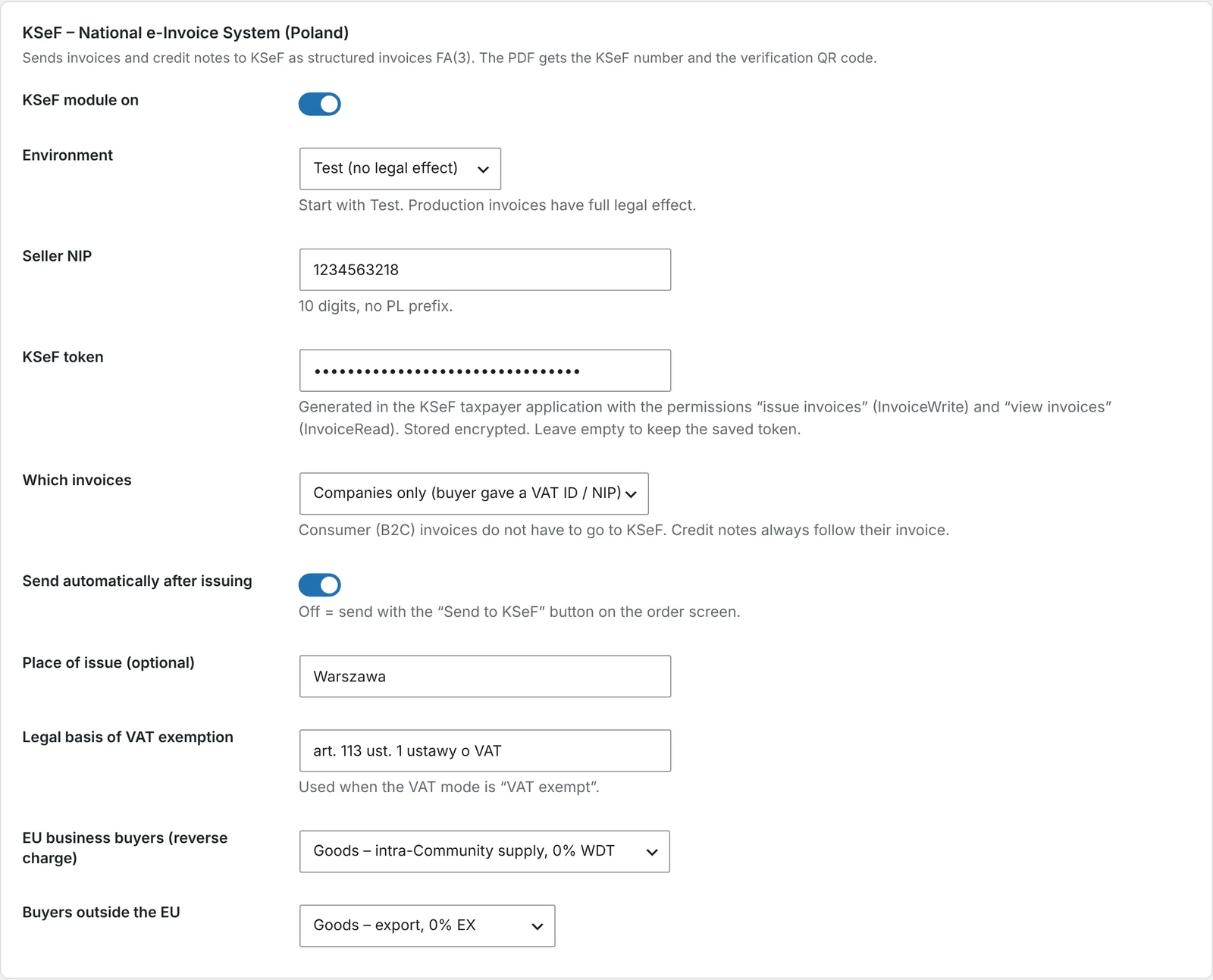
Go to WooCommerce → Invoices → KSeF, choose the environment (start with Test), enter your company VAT ID (NIP) and the token. Decide which invoices go to KSeF: companies only (when the customer gave a VAT ID) or all invoices.
Step 2: test the connection
Click Test connection. Once KSeF confirms it accepted the token, you can switch the module on.
Step 3: turn on background sending
Tick KSeF module enabled and save. From now on, every new invoice and credit note goes to KSeF in the background – no waiting and no clicking. You can also send manually with a button on the order.
Step 4: check the invoice on the order
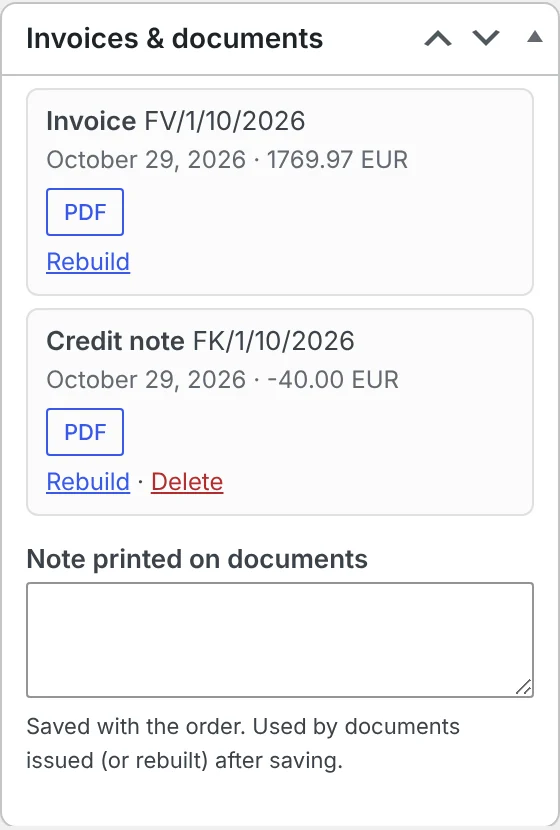
The order shows the sending status and the KSeF number. From here you can also download the UPO (official acknowledgement of receipt) and the XML file. The customer’s PDF shows the KSeF number and a verification QR code.
Step 5: switch to production
When everything works in the test environment, switch the environment to Production and enter your production token.
Things to watch out for
- Test in the test environment. Invoices in production KSeF are real invoices – you can’t take them back.
- Look after your token. It has its own permissions and can be revoked. If sending stops working, check the token first.
- Don’t take shortcuts by deleting invoices. Every mistake is fixed with a credit note. See how to issue a credit note in WooCommerce.
- Consumer invoices. If you don’t have to, you don’t need to send them to KSeF – a PDF is enough. But if you’d rather keep everything in one place, you can send them too.
Frequently asked questions
Do invoices to private customers have to go to KSeF?
No. Issuing consumer invoices in KSeF is optional. The customer still has to receive the invoice in a readable form, such as a PDF.
Will a business customer get the invoice by e-mail?
Formally they receive it from KSeF, but nothing stops you from also sending a PDF with the WooCommerce e-mail and in their shop account.
What if KSeF rejects an invoice?
The error status shows on the order and in the document list, together with the message from KSeF. Once you fix the cause, e.g. the token, you send the invoice again.
Can I test KSeF first without any risk?
Yes. The Polish Ministry of Finance provides a test environment. Invoices sent there have no tax consequences.
Does KSeF apply to my shop if I’m not based in Poland?
Only if you’re VAT-registered in Poland in a way that brings you under the KSeF rules, e.g. with a fixed establishment there. Check with a Polish tax adviser.
5 November 2026 · 6 min read
How to Generate Invoices Automatically in WooCommerce When an Order Is Completed
WooCommerce sends order confirmations but doesn't create invoices. Here's when to issue an invoice in an online shop,…
5 November 2026 · 5 min read
How to Add GPSR Data to Allegro Listings from WooCommerce?
Since December 2024, listings on Allegro must include the data required by the EU General Product Safety Regulation.…
4 November 2026 · 5 min read
How to Get Allegro Orders into WooCommerce Automatically?
Handling Allegro orders in one panel and store orders in another means retyping addresses, parcel locker codes and…
3 November 2026 · 6 min read
How to List WooCommerce Products on Allegro in Polish from a Multilingual Store?
Allegro buyers search in Polish, Allegro has its own categories and required parameters, and titles are limited to…
3 November 2026 · 5 min read
A WooCommerce Plugin That Notifies Your Warehouse and Accountant When an Order Status Changes
Forwarding orders in chat apps and passing e-mails along is daily life for many shops. Learn how to…
2 November 2026 · 7 min read
How to Sync WooCommerce Stock and Prices with Allegro When Your Store Uses EUR?
Selling the same products in a euro-priced WooCommerce store and on Allegro in złoty raises two questions: how…
2 November 2026 · 5 min read
How to Send a Customer a Payment Link for a WooCommerce Order
A phone order, an extra payment after a change, or a payment that didn't go through – in…
1 November 2026 · 7 min read
How to Sell on Allegro from a WooCommerce Store Outside Poland?
Allegro is the biggest marketplace in Poland and Central Europe, and it is open to companies from other…
1 November 2026 · 6 min read
How to Send Customers an Email When a WooCommerce Order Status Changes
WooCommerce only tells customers about a few moments in an order's life. See which e-mails it sends on…
31 October 2026 · 6 min read
How to Change WooCommerce Order Status Automatically by Payment and Shipping Method
Local pickup, cash on delivery, parcel lockers – and in WooCommerce they all land in the same status.…