In short: To sell well on Allegro, your offers need Polish titles and descriptions, the right Allegro category and every required parameter for that category. If your WooCommerce store is in English or another language, the cleanest way is to keep a Polish version of each product (with WPML or Polylang) and send that version to Allegro. Categories and parameters are mapped once for the whole store, so new products are listed correctly from the start. This guide shows what Allegro expects and how to set it up.
Why language matters on Allegro
Allegro is a search-driven marketplace. Buyers type Polish words, and Allegro ranks offers whose titles and parameters match them. A literal translation of an English product name often misses the words people actually use. For example, a “mug” is searched as kubek, and buyers often add the material and capacity: kubek ceramiczny 350 ml.
Allegro can translate offers automatically, but automatic translation doesn’t choose search keywords for you. Polish titles written with Polish search terms almost always perform better.
What Allegro requires from every listing
| Element | Allegro’s rule | Tip |
|---|---|---|
| Title | Max 75 characters | Product type + key feature + size/colour |
| Category | Must be the most specific category (a “leaf”) | Find a similar product on Allegro and use its category |
| Parameters | Required ones depend on the category | Map them from attributes or set fixed values |
| EAN | Helps match the product to Allegro’s catalogue | Fill the WooCommerce GTIN/EAN field |
| Images | At least one | Use variation images for colour variants |
| Description | Allegro’s own layout | Short sections with images work best |
| GPSR data | Manufacturer and safety information | Set once for all products |
Titles: 75 characters
Allegro titles are short. Put the most important words first: what the product is, its main feature and the variant (size, colour, capacity). Skip filler words and marketing slogans – they waste characters.
Categories
Allegro only accepts offers in its most specific categories – those without subcategories. “Home & Garden” isn’t enough; you need something like Dom i Ogród › Wyposażenie › Świece. Your store categories are named differently, so each one has to be mapped to an Allegro category.
Parameters
Each Allegro category has a set of parameters buyers filter by: condition, brand, colour, size, material and more. Some are required. Values can come from:
- a product attribute – your “Colour” attribute fills Allegro’s “Kolor”,
- a fixed value for the whole category – e.g. condition: new,
- product data – SKU, EAN, brand, weight.
Many parameters use Allegro’s own list of values, so attribute values should match those words (in Polish).
Multilingual stores: WPML and Polylang
If your store runs WPML or Polylang, each product can have a Polish translation. The integration should then send the Polish version of the title, description and attributes to Allegro, while your store keeps showing English (or German, Czech…) to your own visitors.
Without a multilingual plugin you can still list in Polish: set a custom Allegro title for each product and use a description template that pulls content from a field you fill in Polish.
How to set it up in WooCommerce
WooCommerce Allegro by wpAsist supports WPML and Polylang and has an English admin interface, so you can manage Polish listings without reading Polish menus.
Step 1: choose the content language and title template
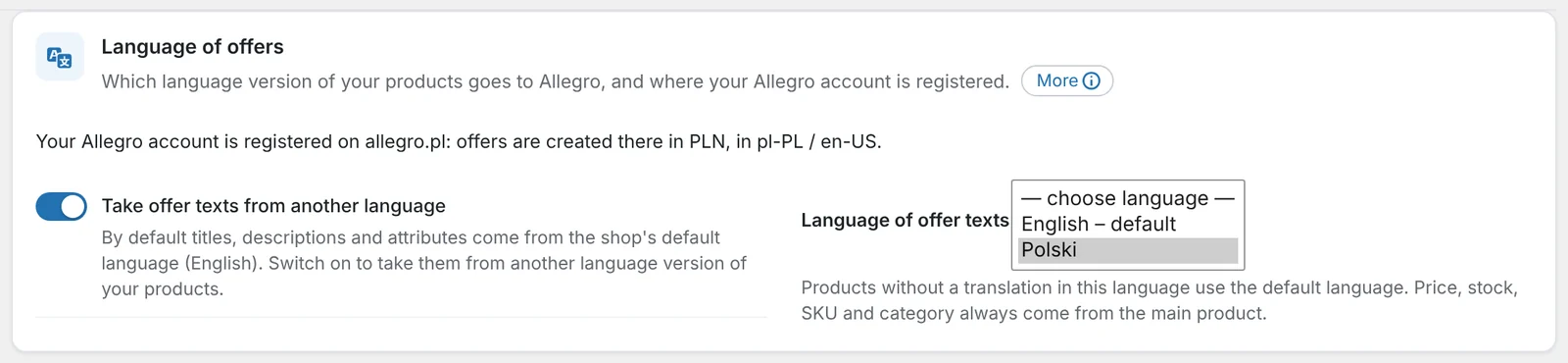
In the offer settings choose the language of the content sent to Allegro (Polish), the title template and where the description comes from. The description can be built from blocks of text and images.
Step 2: map categories and parameters
Map each store category to an Allegro category – a search box suggests matching categories with their full path. Then, for each Allegro category, choose where every required parameter comes from: an attribute, a fixed value, SKU, EAN, brand or weight.
Step 3: exceptions for single products
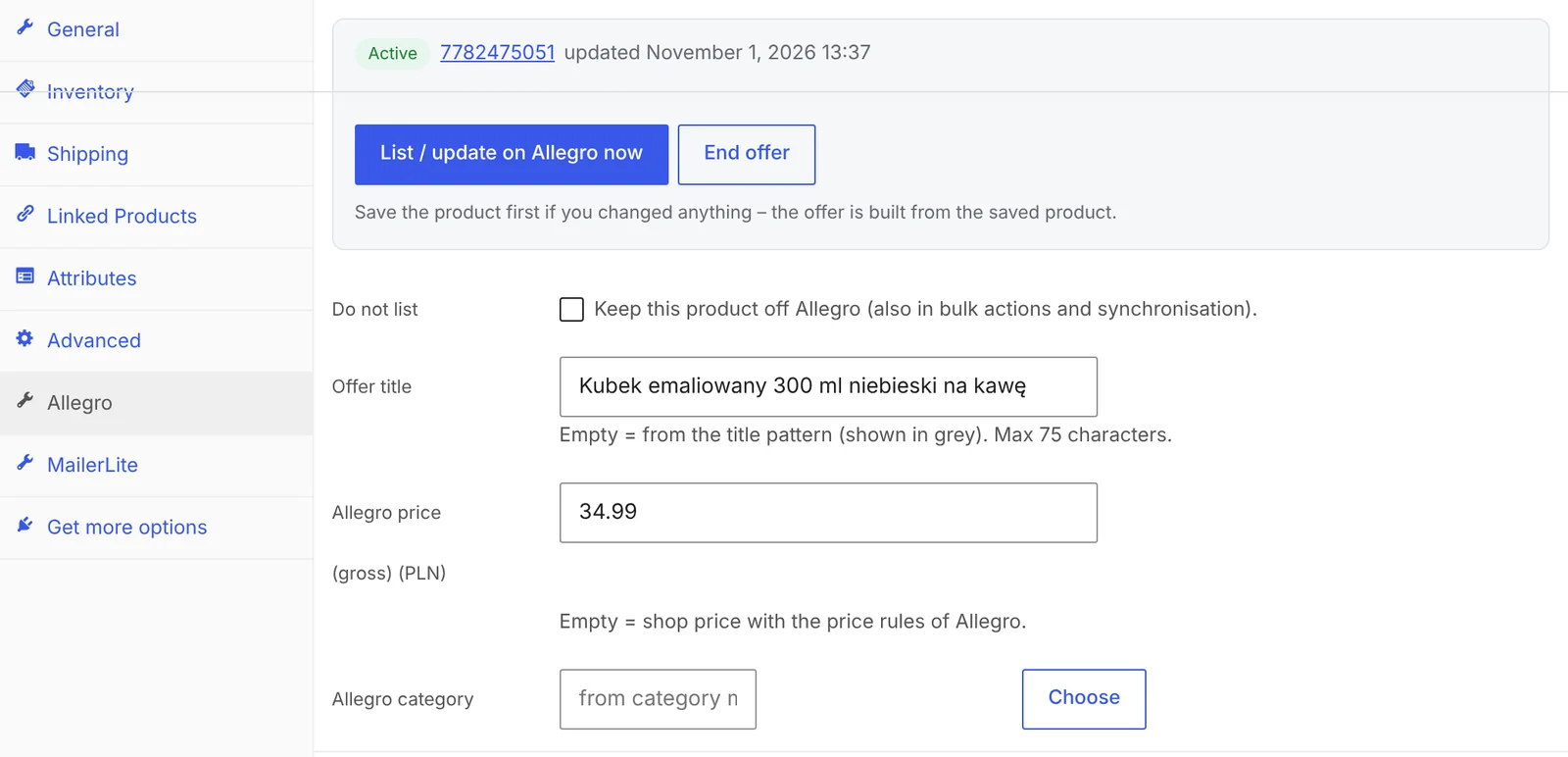
In the product’s Allegro tab you can set a custom title (the template is shown in grey), a fixed Allegro price, a different category or a custom description – only for that product.
Step 4: list products in bulk
Select products on the WooCommerce product list and choose List / update on Allegro. Variable products go to Allegro as one multi-variant offer. If something is missing, the offer gets a status with the reason in plain words, e.g. a missing parameter.
Common mistakes
- English titles on allegro.pl. They rarely match Polish searches.
- Titles longer than 75 characters. Allegro rejects them or cuts them off.
- Too general a category. Allegro accepts only leaf categories.
- Attribute values that don’t match Allegro’s lists. “Black matte” won’t match czarny.
- No EAN for branded products. Without it, Allegro can’t match your product to its catalogue.
Frequently asked questions
Do I need a Polish version of my store to sell on Allegro?
No. You need Polish titles and descriptions for your Allegro offers. A multilingual plugin is the most convenient way to keep them, but custom Allegro titles and descriptions work too.
Does Allegro translate listings automatically?
It can, but automatic translation doesn’t pick Polish search keywords. Polish titles written for search perform better.
How long can an Allegro title be?
Up to 75 characters.
What are Allegro parameters?
Structured product data such as condition, brand, colour or size. Buyers use them as search filters, and required parameters must be filled for the offer to be accepted.
Can variable products be listed as one Allegro offer?
Yes. Each variation becomes its own offer with its own price, stock and image, grouped into one multi-variant offer that buyers see as a single listing.
4 November 2026 · 5 min read
How to Get Allegro Orders into WooCommerce Automatically?
Handling Allegro orders in one panel and store orders in another means retyping addresses, parcel locker codes and…
2 November 2026 · 7 min read
How to Sync WooCommerce Stock and Prices with Allegro When Your Store Uses EUR?
Selling the same products in a euro-priced WooCommerce store and on Allegro in złoty raises two questions: how…
1 November 2026 · 7 min read
How to Sell on Allegro from a WooCommerce Store Outside Poland?
Allegro is the biggest marketplace in Poland and Central Europe, and it is open to companies from other…
4 November 2026 · 7 min read
How to Send WooCommerce Invoices to KSeF Automatically (Poland’s e-Invoicing System)
Poland's KSeF e-invoicing system changed how online shops issue invoices. Here's who it applies to and when, what…
3 November 2026 · 5 min read
A WooCommerce Plugin That Notifies Your Warehouse and Accountant When an Order Status Changes
Forwarding orders in chat apps and passing e-mails along is daily life for many shops. Learn how to…
2 November 2026 · 5 min read
How to Send a Customer a Payment Link for a WooCommerce Order
A phone order, an extra payment after a change, or a payment that didn't go through – in…
1 November 2026 · 6 min read
How to Send Customers an Email When a WooCommerce Order Status Changes
WooCommerce only tells customers about a few moments in an order's life. See which e-mails it sends on…
31 October 2026 · 6 min read
How to Change WooCommerce Order Status Automatically by Payment and Shipping Method
Local pickup, cash on delivery, parcel lockers – and in WooCommerce they all land in the same status.…
30 October 2026 · 6 min read
How to Edit a WooCommerce Order After It’s Been Placed – Even When It’s Paid
A customer calls to add one more product, but WooCommerce won't let you touch the order any more.…
29 October 2026 · 5 min read
How to Rename Order Statuses in WooCommerce (e.g. “Processing”)
"On hold" sounds like a problem, and "Completed" doesn't tell the customer whether the parcel is on its…