
In short: Selling in a WooCommerce store and on Allegro means two product lists, two stock levels and two order panels – unless the store and Allegro are connected. A WooCommerce Allegro integration lets you edit products only in WooCommerce: it lists them on Allegro, keeps stock and prices in sync, pauses offers when stock runs out and brings Allegro orders into your store. Below we describe what to look for in such a plugin and how the wpAsist integration works.
Who needs a WooCommerce–Allegro integration?
- Polish stores that already sell on Allegro and are tired of doing everything twice.
- Stores from other EU countries entering the Polish market through Allegro (see how to sell on Allegro from a WooCommerce store outside Poland).
- Agencies and developers building WooCommerce stores for clients who sell on Allegro.
- Sellers expanding to Czechia, Slovakia and Hungary through allegro.cz, allegro.sk and allegro.hu.
What a good integration should do
| Area | What to expect |
|---|---|
| Listing | Simple and variable products, one by one or in bulk, with categories and parameters mapped once |
| Stock | Two-way sync right after every sale, automatic pause and resume |
| Prices | Markup, fixed amount, rounding, category rules, exchange rate for non-PLN stores |
| Existing offers | Import and link to products without re-listing |
| Orders | Paid orders in WooCommerce with buyer, delivery, parcel locker and invoice data |
| After the sale | Status, tracking number and invoice sent back to Allegro |
| Compliance | GPSR data added to every listing |
| Markets | allegro.cz, allegro.sk, allegro.hu |
| Store setup | WPML/Polylang, HPOS, several Allegro accounts |
How the wpAsist integration works
WooCommerce Allegro by wpAsist is built around one rule: WooCommerce leads, Allegro keeps up. You edit products, prices and stock in the store; the plugin updates Allegro.
Listing straight from the product list
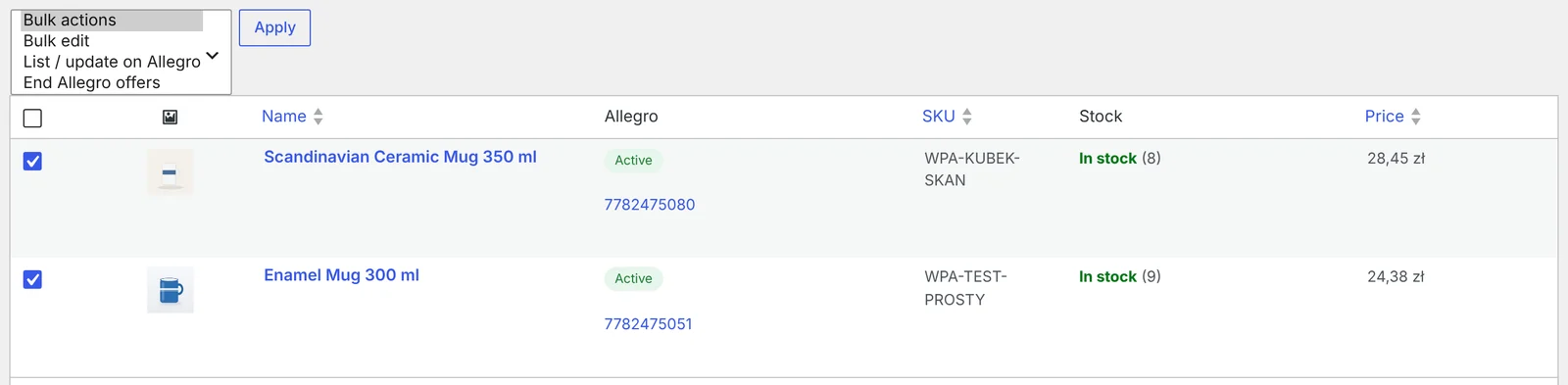
Select products on the WooCommerce product list and choose List / update on Allegro. Variable products go to Allegro as one multi-variant offer. Before anything is sent, the plugin checks the EAN, required parameters and GPSR data, and shows in plain words what is missing instead of a rejected offer.
Stock and prices that look after themselves
A sale on Allegro lowers stock in the store, a sale in the store lowers it on Allegro. Offers pause when stock runs out and resume after restocking. Prices follow your rules: markup, fixed amount, rounding to ,99 and separate rules for categories. Read more in how to sync WooCommerce stock and prices with Allegro.
Your existing Allegro offers
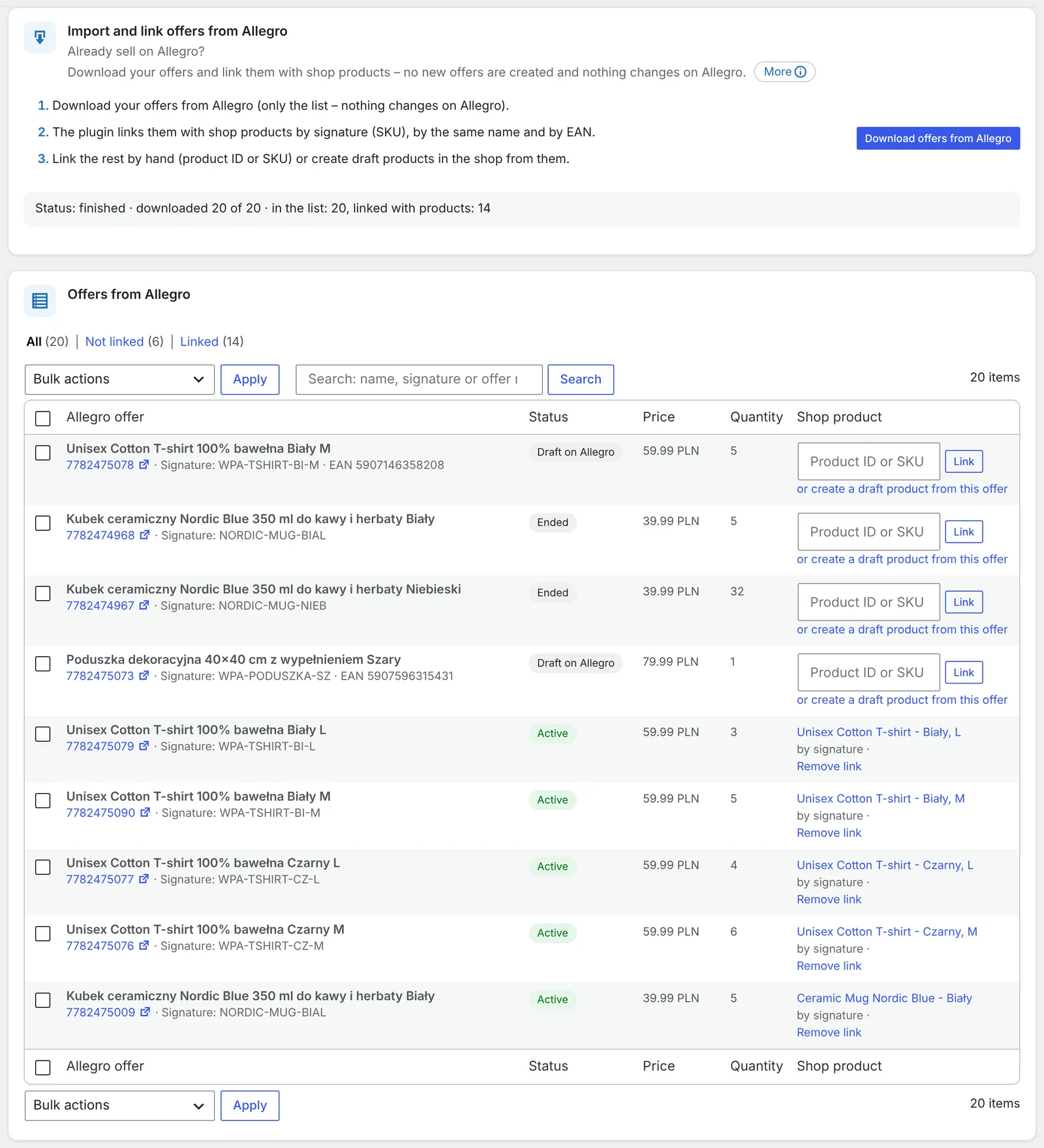
Already selling on Allegro? Import your offers and link them to products by signature (SKU), name or EAN. Nothing changes on Allegro, and offers keep their sales history. Offers that aren’t in your store can become product drafts.
Allegro orders in your store
Paid Allegro orders arrive in WooCommerce with the buyer’s details, delivery method, parcel locker and invoice data. Status changes, tracking numbers and invoices go back to Allegro automatically. Details in how to get Allegro orders into WooCommerce automatically.
Polish listings from a multilingual store
With WPML or Polylang, the Polish version of each product goes to Allegro while your store shows other languages to your visitors. See how to list WooCommerce products on Allegro in Polish.
GPSR in every listing
Manufacturer, EU responsible person and safety information are added to every offer, with exceptions per product. See how to add GPSR data to Allegro listings.
Free and Pro
The plugin comes in a free and a Pro version, and it is currently open to testers. Check the plugin page for the current status and what each version includes.
Frequently asked questions
Does the plugin work with variable products?
Yes. Each variation becomes its own Allegro offer with its own price, stock and image, grouped into one multi-variant offer.
Can I connect more than one Allegro account?
Yes. You can add several Allegro accounts, including a sandbox account for testing.
Does it work if my store isn’t in PLN?
Yes. When your store currency differs from your Allegro account currency, you set an exchange rate, and prices are converted with your markup and rounding.
Will it change my existing Allegro offers?
Importing and linking offers changes nothing on Allegro. Changes happen only for the data you choose to sync – stock, prices, titles, descriptions or images.
Is the admin interface available in English?
Yes – the plugin’s admin interface is available in English and Polish.
5 November 2026 · 5 min read
How to Add GPSR Data to Allegro Listings from WooCommerce?
Since December 2024, listings on Allegro must include the data required by the EU General Product Safety Regulation.…
4 November 2026 · 5 min read
How to Get Allegro Orders into WooCommerce Automatically?
Handling Allegro orders in one panel and store orders in another means retyping addresses, parcel locker codes and…
3 November 2026 · 6 min read
How to List WooCommerce Products on Allegro in Polish from a Multilingual Store?
Allegro buyers search in Polish, Allegro has its own categories and required parameters, and titles are limited to…
2 November 2026 · 7 min read
How to Sync WooCommerce Stock and Prices with Allegro When Your Store Uses EUR?
Selling the same products in a euro-priced WooCommerce store and on Allegro in złoty raises two questions: how…
1 November 2026 · 7 min read
How to Sell on Allegro from a WooCommerce Store Outside Poland?
Allegro is the biggest marketplace in Poland and Central Europe, and it is open to companies from other…
6 November 2026 · 6 min read
How to Issue a Credit Note in WooCommerce When a Customer Returns an Item
Refunding money in WooCommerce is only half the job – if the order had an invoice, you need…
5 November 2026 · 6 min read
How to Generate Invoices Automatically in WooCommerce When an Order Is Completed
WooCommerce sends order confirmations but doesn't create invoices. Here's when to issue an invoice in an online shop,…
4 November 2026 · 7 min read
How to Send WooCommerce Invoices to KSeF Automatically (Poland’s e-Invoicing System)
Poland's KSeF e-invoicing system changed how online shops issue invoices. Here's who it applies to and when, what…
3 November 2026 · 5 min read
A WooCommerce Plugin That Notifies Your Warehouse and Accountant When an Order Status Changes
Forwarding orders in chat apps and passing e-mails along is daily life for many shops. Learn how to…
2 November 2026 · 5 min read
How to Send a Customer a Payment Link for a WooCommerce Order
A phone order, an extra payment after a change, or a payment that didn't go through – in…