
WooCommerce plugin
Omnibus Lowest Price from 30 Days Before a Discount
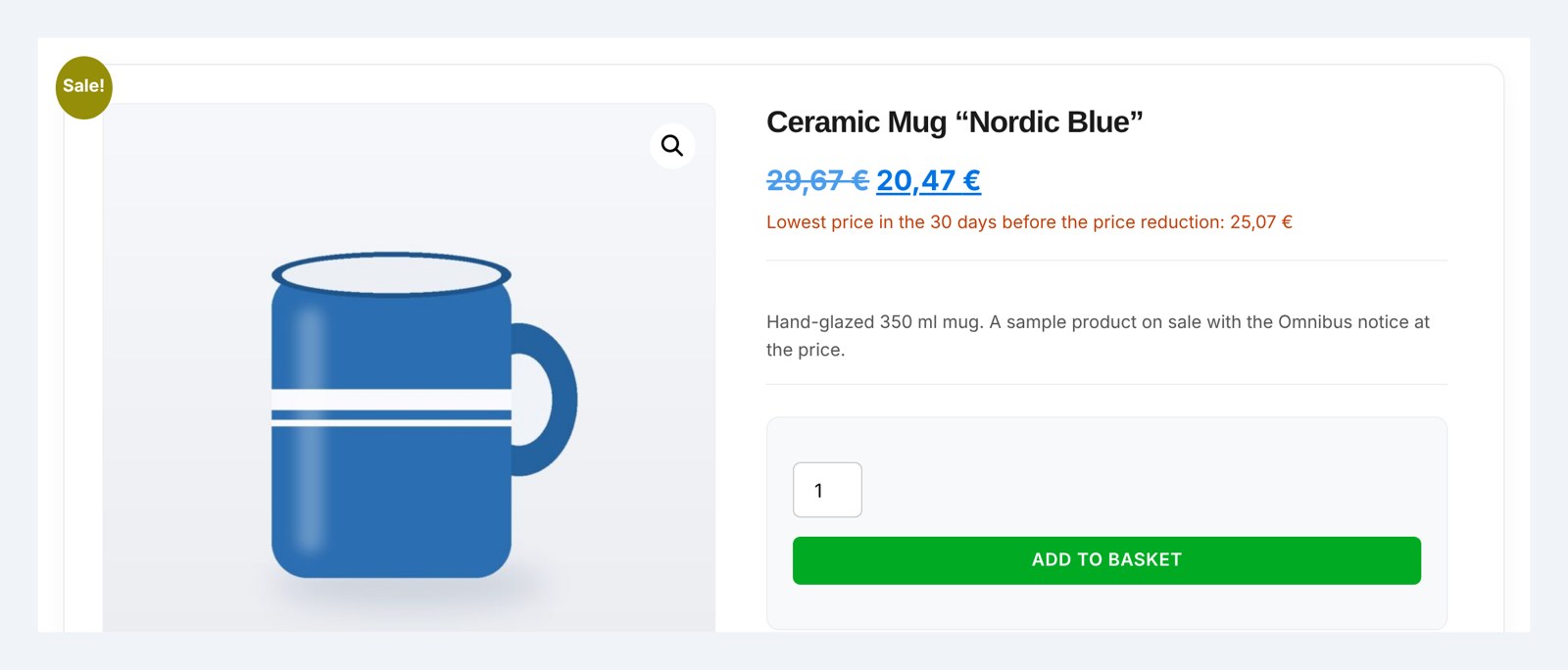
The Omnibus Directive requires showing the product’s lowest price from the 30 days before a price cut whenever you run one. The plugin saves price history automatically and displays this message on the product – with no manual calculations or tracking deadlines.
- Automatic price history — every price change is saved by itself, including scheduled WooCommerce sales and products imported from a file.
- Lowest price from the 30 days before a cut — for variable products, it uses the lowest value across all visible variations.
- The notice right at the price — tick one option and the notice appears above or below the price, in the colour you choose, with no shortcode.
- A message in every store language — the plugin detects the languages from WPML (or Polylang) and gives you a separate text field for each one, with its flag.
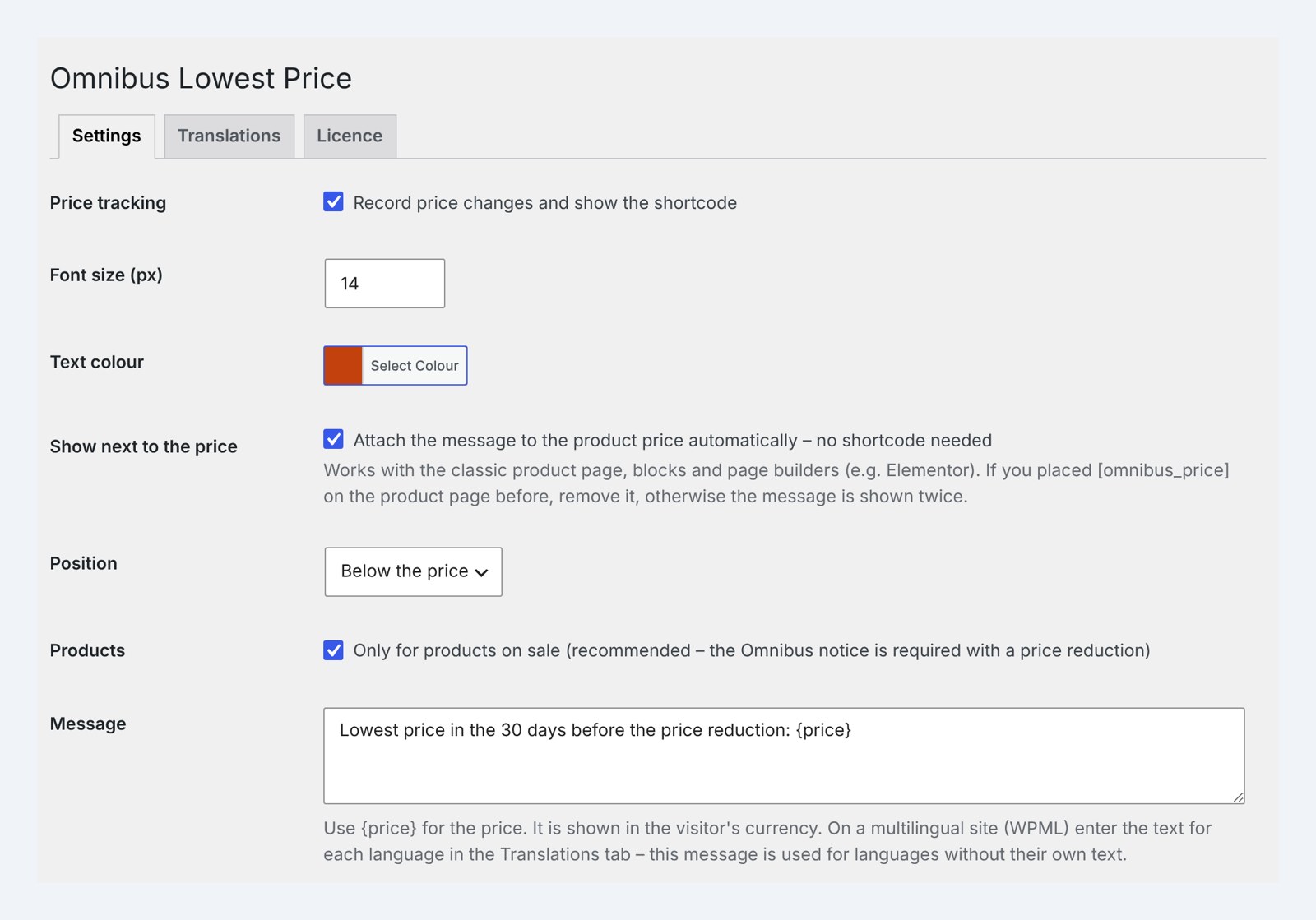
The message looks exactly how you want it – your own text, font size and colour.
- Free: full version for 5 days
- Help with installation
- Access to the forum
- Post-installation support
- Documentation
- Pro: one-year licence
- Step-by-step documentation
- Updates while your licence is active
- Changes and tailoring to your needs
Secure payments verified by STRIPE

 Stripe
- Apple Pay
- Google Pay



- Bank transfer

30 days to say "nah, not for me"
Bought Pro and it is not your thing after all? Write to us within 30 days and you get your money back – no interrogation, no hard feelings. We may just ask what to improve, so next time it is a "wow".
An Omnibus requirement that calculates itself
The Omnibus Directive requires showing, with every price cut, the product’s lowest price from the 30 days before that cut. Without a tool, that means manually tracking prices and watching dates for every single promotion.
Tracking price history by hand is bound to go wrong
Prices change through scheduled sales, manual edits and imports from a supplier’s file. To correctly calculate the lowest price from the 30 days before a cut, you’d have to log every change by hand – and one missed change is a compliance risk.
Price history saved automatically, always:
Every price change goes into the history
Every time a product is saved, the plugin records the price change – including sales scheduled in the WooCommerce calendar and products imported from a file or a wholesaler. History covers 90 days, so the 30-day pre-cut window is always complete, even for long-running sales.
The lowest price, calculated exactly as the law requires
For a product on sale, the plugin finds the lowest price from the 30 days before the sale’s start date. For a product with no sale, it shows the lowest price from the last 30 days. For variable products, it takes the lowest value across all visible variations.
Example: a product cost 100 zł, dropped to 85 zł 10 days ago, and today you’re cutting it to 70 zł — the message will show 85 zł as the lowest price from the 30 days before the cut, exactly as the law requires.
A message in your own words – right at the price
You write the text yourself, e.g. “Lowest price in the 30 days before the price reduction: {price}”, and choose the font size and the text colour. Tick “Show next to the price” and the notice appears above or below the product price by itself – only for products on sale, with no shortcode to place. Works with the classic product page, blocks and Elementor. The price is shown with or without tax, the same way as other prices in your store.
A message in every store language
On a multilingual store the plugin detects the languages set up in WPML by itself (Polylang is supported too). The Translations tab has a message field for each language – with its flag and the default language marked – so there is no hunting for the text in String Translation. Customers see the message in their own language, and a language without its own text gets the main message. If a translation is missing {price}, the plugin warns you straight away.
Works wherever your store works
With WooCommerce Multilingual (WCML), the price converts to the currency the customer is browsing in, and you set the message for each language in the Translations tab. The plugin is HPOS-compatible and works with the WooCommerce block checkout.
You’re up and running in a few minutes
Installation takes a few clicks: upload the ZIP, activate the licence and tick “Show next to the price” – the message appears at the price on every product page straight away. You can also place it with the [omnibus_price] shortcode – in the product’s short description, in a block, or in a product page template (e.g. in Elementor). Outside the product page, use [omnibus_price id=”123″]. History starts counting from the day the plugin is installed.
Free or Pro? Find out on your first sale
Download the full version for free and get 5 days to check the message on real products and real sales. If it’s the right fit, upgrade to Pro with one click, no reconfiguration needed.
Pro is a one-year licence (€22.31): updates from the WordPress dashboard, full support and every feature with no limits. Even if the licence expires, your saved price history stays safe in your store.
Test it free for 5 days
Full version now, no card and no strings attached. When it works for you – get PRO!
Installation help · Guide · Customer forum · Support · Updates · Tailored to your store · Secure payments · 30-day money-back guarantee